Human-in-the-Loop SOC: Where Analysts Must Approve AI Actions Human approval is a control, not a sign automation failed. It keeps consequential actions accountable while an AI agent handles evidence at machine speed.
Human-in-the-Loop SOC: Where Analysts Must Approve AI Actions
Human approval is a control, not a sign that automation failed. It keeps consequential actions accountable while allowing an agent to handle preparation and evidence gathering at machine speed.
Require approval for impact
Isolating production systems, disabling identities, blocking critical domains, deleting evidence, or closing an incident should require an authorised reviewer.
Make the approval useful
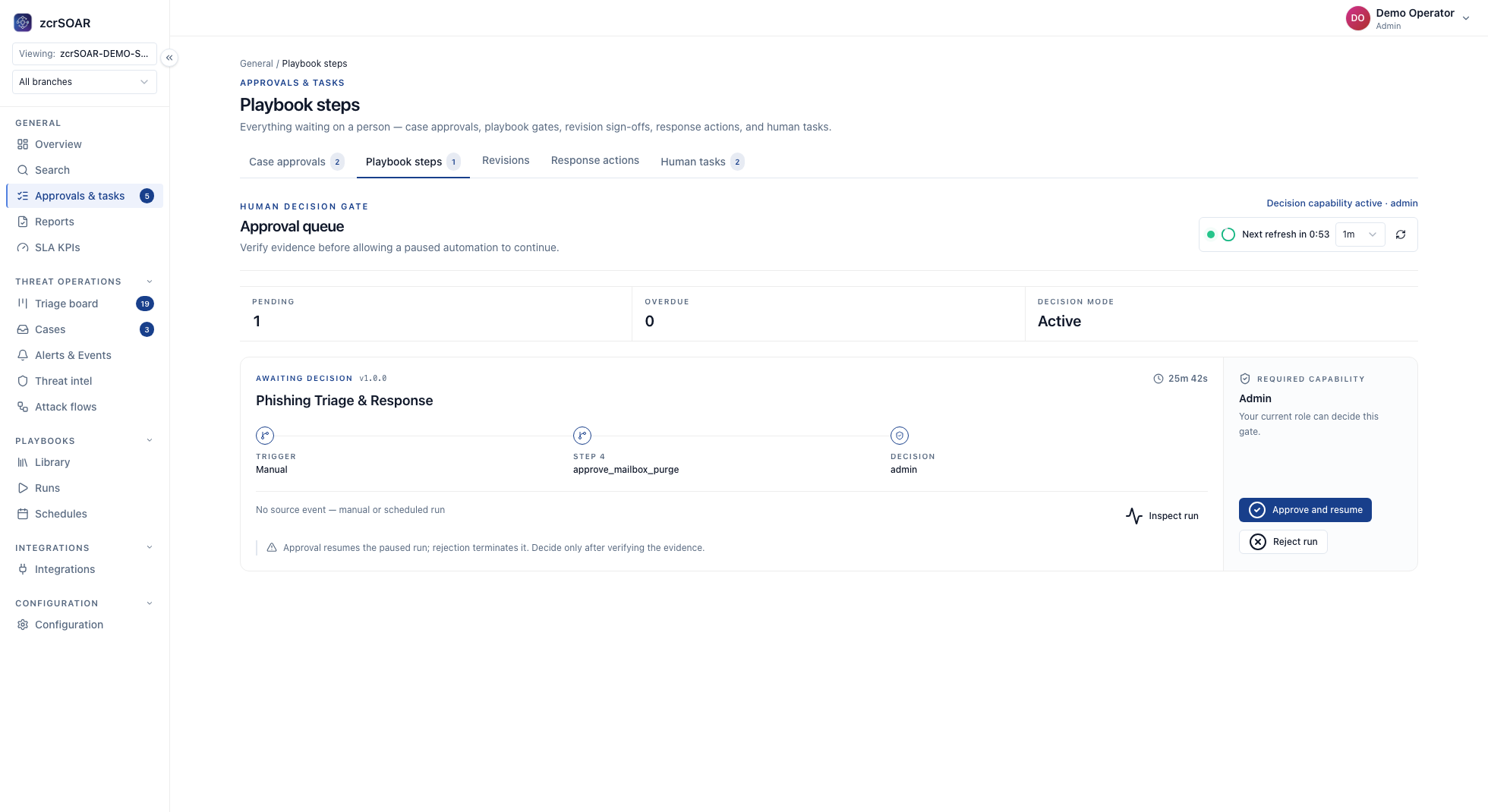
Show the evidence, proposed action, expected impact, confidence, and rollback path. A reviewer should be able to approve or reject without repeating the entire investigation.
Record the decision
Store who approved the action, what evidence was shown, which tools ran, and what changed. This record supports incident review and customer communication.
Grade each action by what happens when it is wrong
A queue full of trivial requests teaches approvers to click through unread. Ask three questions of every action: can it be undone within minutes without hurting the business (in Automatically Containing a Ransomware-Infected Host — With a Human Approval Gate , host isolation sits on the side that needs a person), how many systems and business units are hit if it is wrong, and does it touch evidence or the incident record?
Approvers may see model confidence, but it should never move an action between classes: a model can be confidently wrong, and a crafted email can steer it (OWASP's own example). OWASP LLM06:2025 (Excessive Agency) recommends human approval of high-impact actions before they are taken.
The approval matrix: a recommended pattern
Action class Gating Who may approve Approver must see Extra record to keep 1. Read, enrich, draft (searches, lookups, ticket or takedown draft text), and steps that change nothing on the target (copy evidence to protected storage, open the case, page people) Autonomous; drafts stay proposals None to read or draft; sending a drafted ticket or takedown is row 4 Query and result in the case Input, result 2. Releasable containment, one non-critical, non-production target (isolate one endpoint or disable one ordinary account; zcrSOAR isolates and releases via SentinelOne) Approval On-duty analyst, not the requester Alert evidence; host per asset inventory; what is cut off; how to undo Approver, time, what was shown, rejection reason 3. Wider containment (production or critical asset; executive or service account; shared infrastructure; critical-domain block; several targets) Approval, two people from different roles Incident commander and asset owner Row 2 plus the dependent business process Each approval separately; owner notified 4. Formal outputs (sending a drafted ticket or takedown, closing an incident, customer or regulator notice) Approval; count per your policy (zcrCTEM sets it per protected asset for takedowns) Reviewer who did not work the case; legal or DPO for notices Exact text as sent; timeline; open items Version sent; approvers; result 5. Destroying or overwriting evidence (delete, wipe, reimage, purge mailboxes) Blocked None in a playbook; a named administrator by hand after authorised sign-off Evidence is preserved Who did what; evidence reference 6. Changing the automation (enable a playbook in production, Approval to Autonomous, wider connector permissions) Approval Engineering lead who did not make the change; risk owner for a move toward Autonomous Version diff; dry-run result; extra assets reachable; for Autonomous, Approval history and undo test New version; author and approver differ; roll-back kept
Documented in zcrSOAR : gating set per playbook step (Autonomous runs at once, Approval waits for a role-gated sign-off, Blocked never runs until the gating changes); one role-gated queue, approvers assigned by action type, severity, asset, site or business unit; and the execution record (user, action, playbook, connector, input, result, status). Customer configuration: who fills each role and what counts as critical.
Apart from zcrCTEM's analyst approval of AI drafts, "Approval" in rows 4 and 6 is a rule your procedure enforces. zcrSOAR's own response approval matrix is a separate feature.
Separation-of-duties rules
Recommended pattern, following the separation-of-duties principle in NIST SP 800-53 AC-5:
The requester never approves (agent, playbook or analyst), and a playbook's author does not enable it. zcrSOAR lets you limit playbook and connector actions by role (approve is separate from create, edit and enable). Do not assume self-approval is refused; test it in non-production.
Clicking approve is not the permission check. OWASP recommends enforcing authorisation downstream (complete mediation), not trusting the model, so give each connector's account only the rights the table needs (customer configuration).
The approver answers for the target, so route by asset, site and business unit. For row 3's two approvers, chain two Approval steps routed to different roles and test that in a non-production setup.
When nobody approves in time
Documented: an Approval step waits, so the gated step does nothing meanwhile. Customer procedure: decide how long a request may wait and what happens at the deadline.
Recommended pattern: a timed-out request is a rejection with a recorded reason, never an approval. A named queue owner rejects it at the deadline, after escalating to the next approver through connected notification channels. A late approval does not revive it: recheck the target and alert, then raise a new request. Meanwhile, steps that change nothing on the target (reading, enriching, drafting, copying evidence to protected storage, opening the case, paging people) may continue, and every step that changes state on the target waits.
The risk owner should accept the wait in writing. If one narrow, reversible action cannot wait, staff an approver rota. Autonomous has a higher bar, set out in AI-Assisted SOC vs Autonomous SOC : the step is reversible, has run under Approval for a review period with no approval later reversed, and has a tested undo path.
Where the gate breaks and when to escalate
Recommended pattern: send each trigger to the CISO or risk owner.
Rubber-stamping. If nearly every request is approved on sight, nobody is deciding. Compute approval rates per reviewer from the approval records; escalate when a reviewer never rejects across a review period.Approving the model's story. Show target, owner and parameters from the source system beside the agent's summary, and escalate on a mismatch.Loosened gating and unlisted actions. Escalate when a row 3 or row 4 step moves to Autonomous, or any row 5 step leaves Blocked. Treat an unlisted action as Blocked until someone classifies it (not a zcrSOAR default).
Frequently asked questions
Does requiring approval slow ransomware response too much?
It adds a wait to gated actions. Row 1 runs at once, so the case reaches the reviewer with evidence gathered, leaving mostly the decision.
Can a second AI approve instead of a person?
A second model can add checks, but a model checking a model stays inside the models; an approver exists so a named person answers for the action. In zcrCTEM , an AI-drafted ticket or takedown stays a proposal until an analyst approves or rejects it.
Who approves when a managed service runs the queue?
zcrSOC is a managed service delivered through an approved channel partner; Essential runs on zcrSIEM and Response adds zcrSOAR. Recommended pattern under Response: business-impacting actions stay with the customer's asset or business-unit owner, and the partner approves only row 2, within the contracted scope.
Sources
Continue: Using AI Agents With Existing EDR , From Alert to Evidence: An Auditable AI SOC Workflow and the AI SOC Agent guide .
Explore zcrSOC · Compare pricing · Contact zcr
If you'd rather talk through your own environment, here's how to reach us.
Products | Pricing | Resources | Insights | Contact