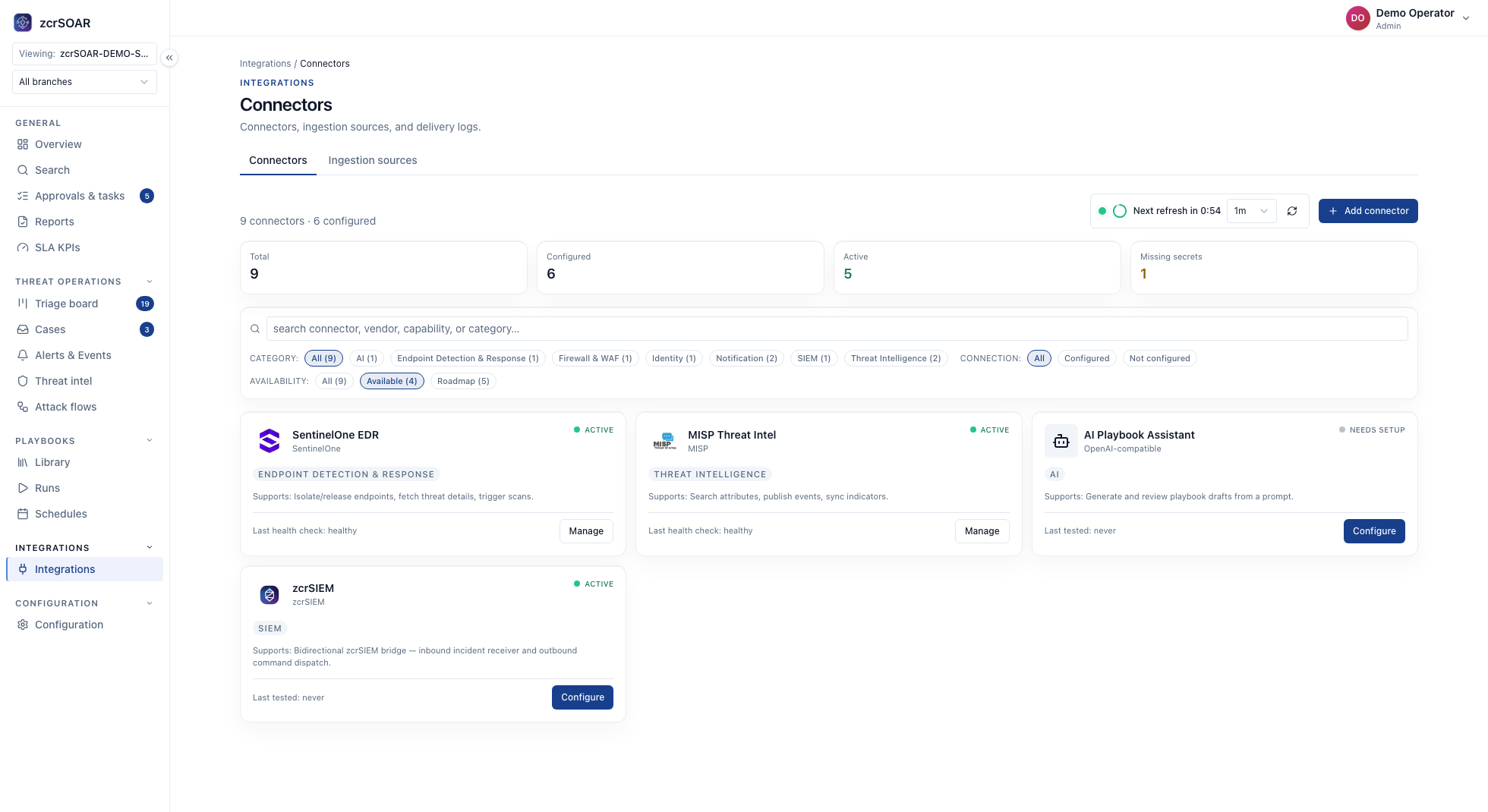
Using AI Agents With Your Existing EDR: SentinelOne and BYO An AI SOC agent doesn't replace your EDR. Keep it as the control point (SentinelOne is the documented example), start read-only, then define what it can act on.
Using AI Agents With Your Existing EDR: SentinelOne and BYO
An AI SOC agent does not require replacing your EDR. The safer approach is to keep the EDR as a telemetry and control point, then define exactly what the agent may read, recommend, and execute.
Start read-only
Begin with alert context, endpoint timeline, identity information, and threat-intelligence enrichment. Validate the evidence before granting response permissions.
Define action tiers
Separate recommendations, analyst-approved actions, and fully automatic low-risk actions. Keep production isolation and identity changes behind approval.
Document the boundary
The integration should name supported data, retention, rate limits, response actions, and escalation ownership. This prevents “connected” from being mistaken for “fully managed.”
Two questions to answer before any credential is issued
What must the EDR expose for reading? Recommended pattern: ask for this much first.
The detection: the EDR's own ID and the payload as received.
The endpoint's identity: device ID, hostname, and its customer or site.
EDR agent status, including last-seen time and current isolation state.
Process, network and file activity for that endpoint in a bounded window.
What the EDR already did itself: blocked, quarantined or left alone.
If your EDR cannot expose one of these through the chosen method (zcrSOAR documents API, Webhook, Syslog, Native Connector and Custom Integration), record a gap. Do not let the AI agent guess.
Which actions may ever be requested? Group them by what one call can reach, then by whether you can undo it.
One endpoint, undoable: trigger a scan; isolate an endpoint and release it. Release needs equal care: it reconnects a machine you suspected an hour earlier.
One endpoint, hard to undo: delete a file, kill a process, run a remote script.
Many endpoints, or the EDR itself: act on several endpoints at once, change EDR policy, uninstall the EDR agent.
The integration scope table
One row per EDR capability and customer environment; a row you cannot fill in is a capability to leave unconnected. The gating column uses the three states zcrSOAR documents per playbook step (Autonomous, Approval, Blocked); the values are a recommended pattern.
EDR capability Direction Least-privilege scope to grant Gating class Evidence to keep Detections and endpoint status Read Read-only, one customer's tenant or site Autonomous (read only) EDR detection ID, payload as received, last-seen time and isolation state Endpoint activity timeline Read Read-only, time-bounded, separate from action credentials Autonomous; query budget per case Query, time window, complete or partial Trigger a scan Act (reversible) Scan only, one customer's endpoints Approval; Autonomous for a low-risk group only if it is reversible, has run under Approval for a review period with no approval later reversed, and has a tested undo path Approver, device ID, EDR job ID if the EDR returns one, result Isolate an endpoint Act (reversible, disruptive) Isolate only, one endpoint per request Approval Approval record, asset criticality, state before and after Release from isolation Act (reversible, reconnects host) Release only, one endpoint per request Approval; approver sees evidence the host is clean Approver, that evidence, state before and after Delete file, kill process, remote script, change EDR policy, uninstall EDR agent Act (hard to reverse) No credential the AI agent can use Blocked Each request, logged as a manual task with requester and reason
Recommended pattern: keep read and act on separate credentials, so revoking the act credential leaves reads working. If your EDR's roles cannot split scan, isolate and release, block the extra actions in the playbook and assume the credential is broader than the table. "One endpoint per request" is a playbook rule, not an EDR role.
Documented, recommended, and yours to configure
Documented in zcrSOAR. EDR is among the categories it works across; the catalogue example is isolating or releasing an endpoint and triggering a scan through SentinelOne from a case or playbook step. zcrSOAR records timestamp, user, action, playbook, connector, input and result for each execution. Unapproved playbooks stay in Draft, Test, Dry-run or Simulation Mode until production is authorised. Its AI feature is an assistant that drafts a playbook from a prompt for review.
Documented for zcrMDR. It can work with your existing EDR workflow; integrations, response actions and SLA are defined at onboarding. It is a managed service delivered through an approved channel partner.
Recommended pattern and customer configuration. The table's values and the failure-mode checks are recommended patterns. Creating EDR credentials, naming approvers, choosing which scan groups may be Autonomous and wiring your AI agent to zcrSOAR playbook steps are customer configuration.
Failure modes and escalation triggers
Stale telemetry. An old last-seen time may mean the machine was reimaged, moved or taken offline. zcrCTEM shows per-asset EDR coverage (present, missing or unknown), which finds blind spots but is not a pre-action check.
Recommended pattern: re-read EDR agent and isolation state before every act step, stop if last-seen is older than the customer's limit, and queue the case for a person marked "context incomplete".
Escalate when a critical asset's EDR agent is missing or unconfirmed.
The same detection arriving twice. zcrSOAR can ingest from a connected EDR platform and bridge to zcrSIEM when both are deployed; zcrSIEM groups endpoint and other alerts into one incident. If both paths open cases, one detection can become two.
Recommended pattern: carry the EDR's detection ID on every case, search for an open case with that ID before creating one, and build the idempotency key from detection ID, action and target, so a repeated isolate counts as the same request.
Escalate when two cases sit on one endpoint: a person merges them.
API rate limits. The ceiling is in the vendor's API documentation; investigation queries usually reach it before actions do.
Recommended pattern: time-bounded queries, a query budget per case, results kept in the case, and no retry of an act step in a loop. On HTTP 429 (too many requests in a given time, per RFC 6585) wait as the response asks. Retry-After is optional (MAY), so the playbook needs its own default back-off.
Escalate when reads cannot finish; do not act on half the data.
Tenant isolation for an MSP. With one credential shared across customers, one leaked token or wrong target reaches all of them.
Recommended pattern: one credential and connector per customer, scoped to that customer's tenant or site; a check before every act step that the target's device ID belongs to the case's customer; a query budget per customer.
If a target belongs to another customer, stop the playbook and escalate.
Frequently asked questions
Can we bring our own EDR, such as the CrowdStrike we already run?
Keeping your EDR is the recommended pattern. The zcrSOAR example zcr documents is SentinelOne; for CrowdStrike or any other EDR, have an approved channel partner confirm in writing which actions are available before you build a playbook.
How do we test it before it may act?
Recommended pattern: run read-only first and compare what the AI agent gathers for a real past detection with an analyst's manual pull. Then dry-run with act steps set to Approval.
As an MSP, who approves an isolate on a customer's machine?
Recommended pattern: agree in writing before onboarding who may approve isolate and release for each customer; it is a contract decision. zcrSOAR can route approvals by asset, site or business unit.
Sources
IETF (RFC Editor), RFC 6585: Additional HTTP Status Codes , April 2012, accessed 2026-09-28.
Continue: From Alert to Evidence: An Auditable AI SOC Workflow , Human-in-the-Loop SOC , the AI SOC Agent guide and how to forward EDR logs to a SIEM .
Explore zcrMDR · Compare pricing · Contact zcr
If you'd rather talk through your own environment, here's how to reach us.
Products | Pricing | Resources | Insights | Contact