What Is CTEM? — Seeing Your Systems the Way an Attacker Does, Before They Do
What is CTEM, and how is it different from a vulnerability scan? A plain-English breakdown of Gartner's 5-stage CTEM framework and when your org needs it.
What Is CTEM? — Seeing Your Systems the Way an Attacker Does, Before They Do
Picture a company that hires guards to walk the building once a quarter. They check the front door, test the locks they know about, review the camera footage, and file a tidy report for management. Sounds thorough — except between those quarterly walks, every department is quietly adding new back doors every week without telling security. Some get left unlocked. Some the guards never even knew existed.
That's the real state of most organizations' external attack surface. IT knows the assets it built and owns. But marketing might spin up a campaign microsite through some SaaS tool nobody vetted. Developers might leave a test API endpoint open after shipping the real one. An old domain from a campaign that ended two years ago might still resolve to a server nobody's patched since. None of this shows up on security's radar — until someone else finds it first. And that someone is usually an attacker, not your own team.
CTEM (Continuous Threat Exposure Management) is the approach Gartner proposed specifically to close this gap. Instead of scanning for vulnerabilities on a schedule or running an annual pentest, CTEM is a continuous cycle that looks at your systems from the outside — the way an attacker actually would — and keeps looking, on repeat. Not a snapshot you file away.
CTEM isn't just another vulnerability scanner
The most common misunderstanding is treating CTEM as a vulnerability scanner that happens to run more often. The real difference is in perspective and prioritization:
| Traditional Vulnerability Scan | CTEM |
|---|
| Vantage point | From inside the network you already know | From outside, like an attacker — including assets you didn't know existed |
| Frequency | Periodic (monthly/quarterly) | Continuous |
| How it prioritizes | Mostly by CVSS score | By actual business impact + whether an exploit is being used in the wild (KEV) |
| What you get | Hundreds or thousands of findings | A short list of what actually needs fixing first, with a clear remediation path |
In short: a vulnerability scan tells you "we found 500 issues." CTEM tells you "of those 500, 8 are exploitable right now and should be fixed this week." Fewer items, far more signal.
The 5 stages of CTEM, per Gartner's framework
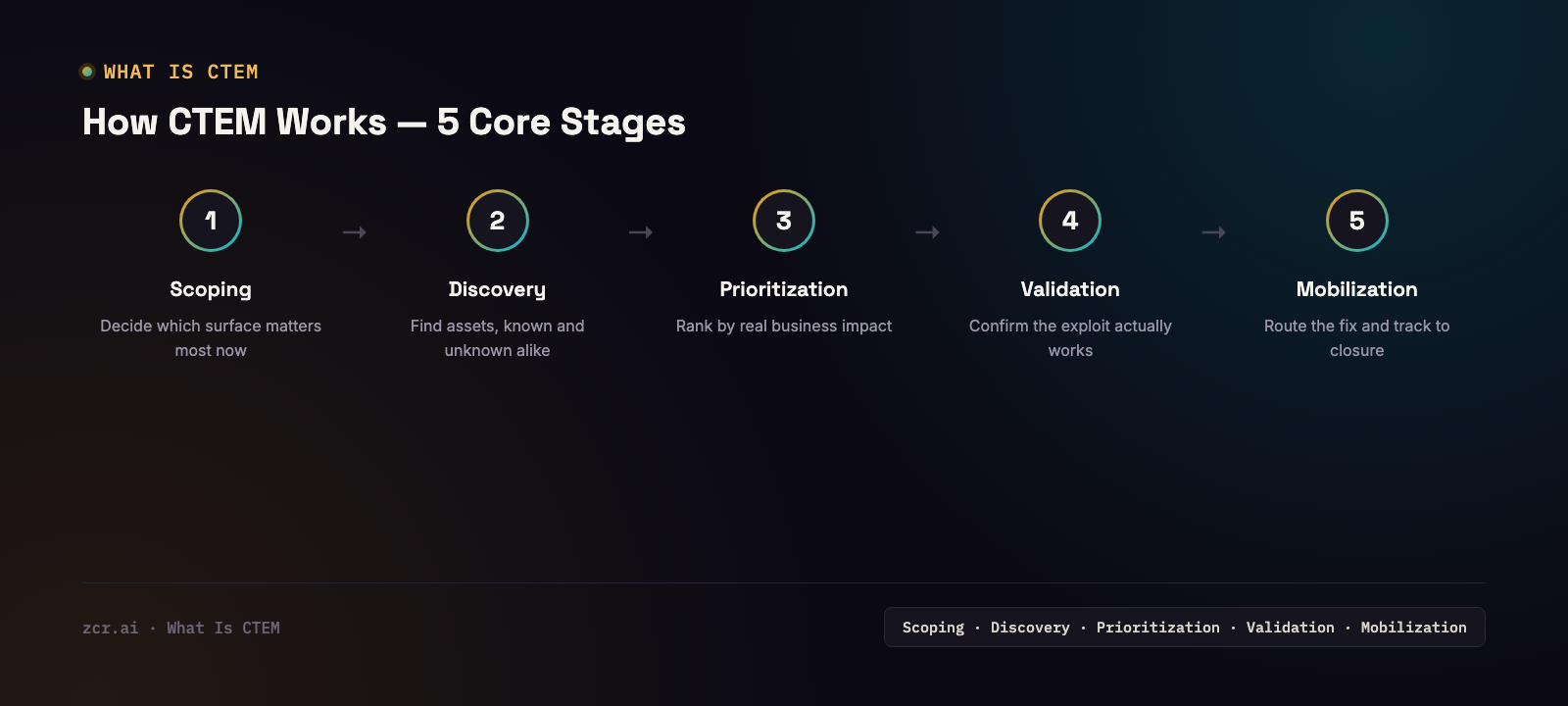
1) Scoping — Decide which part of the attack surface matters most right now — usually the systems that hold customer data or generate revenue directly.
2) Discovery — Scan for every asset exposed to the internet, known and unknown alike (domains, subdomains, APIs, cloud storage, certificates).
3) Prioritization — Score each finding not just by CVSS, but by whether a working exploit exists (KEV) and how critical that asset actually is to the business.
4) Validation — Test whether a given vulnerability is actually exploitable in your current environment, or whether other controls already reduce the real risk.
5) Mobilization — Route the fix to the right team and track it to closure — not just log it in a dashboard that nobody has time to work through, the way annual pentest reports usually end up.
What this looks like in the zcrCTEM console
Here's what this looks like in the zcrCTEM demo's Command dashboard — a single view that summarizes both overall posture and what needs a decision today: SLA-breach tracking across tenants (for MSSPs managing multiple clients), critical exposures queued for triage, and a "decide today" queue that pulls everything into one place — leaked credentials found on the dark web, known-exploited vulnerabilities (KEV) like an Apache Log4j RCE, and even a PDPA data-erasure request with its own response deadline. The demo runs on sample tenant data, so treat this as a description of what the console tracks, not a specific incident count.
The point is that it's all in one place. Analysts aren't stitching the picture together across five different tools before they can decide what to work on first.
Signs your organization is ready for CTEM
- Nobody on the team can confidently say how many internet-facing assets you actually have
- You've discovered a subdomain or old system still running that nobody knew about (usually after it's already caused a problem)
- Your annual pentest report is a thick PDF nobody has time to work through
- Different departments (marketing, dev, regional offices) spin up their own SaaS tools or systems without telling IT
- You're subject to PDPA and have wondered how quickly you'd actually find out about a data leak
If two or three of those sound familiar, zcrCTEM is built specifically to close that gap.
What zcrCTEM covers
zcrCTEM brings three core capabilities into one platform:
- External Attack Surface Management (EASM) — continuously discovers and tracks internet-facing assets without waiting for another team to report them. See External Attack Surface: The Blind Spot Attackers Find Before You Do for the full breakdown.
- Digital Risk Protection (DRP) — monitors for data leaks, brand impersonation, and dark web signals. See How to Monitor Dark Web Data Leaks for details.
- PDPA & Compliance mapping — connects findings directly to the PDPA controls they affect, so you're not translating exposure data into compliance language by hand.
If you're evaluating how to get a real picture of your exposure, check the zcrCTEM pricing against the size of your asset base.
Get in touch
Curious how many blind spots your organization actually has? Our team offers a free consultation.
Sources